
A Lecke végén letölthetö a Rozsa jpg kép.
Ha a saját képed használod akkor Image- Resize- 60%- ra le kell venni.De most készisd el a megadott képpel.
A lekicsinyitett képet a Slections Tool- Rectangle- - val kijelölöd igy:

Edit- Copy- Edit- Paste as a New Image

Adjust- Sharpeness-Unsharp Mask
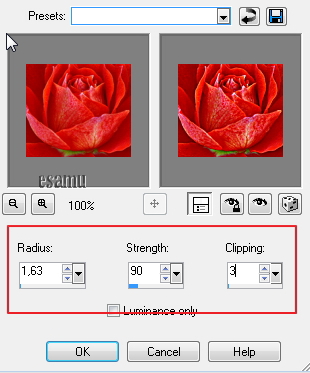
Effects-Plugins- FM Tools-Seamless Tile igy:

Ismételd meg ezt a lépést de most a Vertical- ban van pipa

FM Tools-Blend Emboss

Ismételd meg ezt a lépést is.
Eredmény ha jol dolgoztál ilyen:

Save-as mentsd el BMP formátumban.
Most a PSP Texture Mappába másold be.
Most kiprobáljuk az uj Texture- nket.
400x400 Transparent lapot kiöntunk a Foreground szinnel lehet bármilyen szin, én ezt használtam most:
#b30c08 Foreground
#ffc0c0 Background
Materials- nál a Texture váltsd át
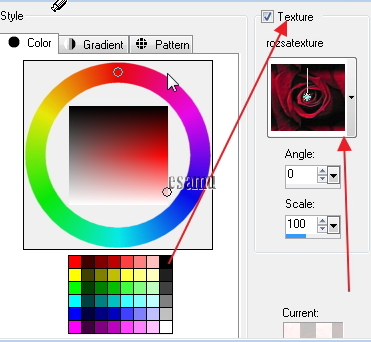
Most az Airbrush következik.


. Mostmár tovább szerkesztheted a nyomatos képet.

Jo szerkesztést.


/https%3A%2F%2Fekladata.com%2F0X4KNnu8i_2CJBIUmVT4Uyua1cU%40500x346.jpg)
/https%3A%2F%2Fekladata.com%2FcjRyoA4CNYPbhgsG4RUK5QRup5M%40500x356.jpg)
/https%3A%2F%2Fekladata.com%2FAr12x3a1YgiLpkVKOcMFwaatVD0%40500x350.jpg)